<!DOCTYPE html>
	<html lang="vi" xmlns="http://www.w3.org/1999/xhtml" prefix="og: http://ogp.me/ns#">
	<head>
<title>Cách bật bộ gõ tiếng Việt Telex mặc định trong Windows 10 May 2019</title>
<meta name="description" content="Cách bật bộ gõ tiếng Việt Telex mặc định trong Windows 10 May 2019 - Savefile - Tin Tức -...">
<meta name="author" content="TẤT THÀNH COMPUTER - MÁY TÍNH - HIEND COMPUTER - GAMING GEAR - LẶP ĐẶT CAMERA - MÁY TÍNH KIẾN ĐỨC LÂM ĐỒNG - PC ĐĂK NÔNG -SỮA MÁY TÍNH">
<meta name="copyright" content="TẤT THÀNH COMPUTER - MÁY TÍNH - HIEND COMPUTER - GAMING GEAR - LẶP ĐẶT CAMERA - MÁY TÍNH KIẾN ĐỨC LÂM ĐỒNG - PC ĐĂK NÔNG -SỮA MÁY TÍNH &#91;tatthanhcomputer@gmail.com&#93;">
<meta name="robots" content="index, archive, follow, noodp">
<meta name="googlebot" content="index,archive,follow,noodp">
<meta name="msnbot" content="all,index,follow">
<meta name="google-site-verification" content="trv-gicI9Ys7h7Bl_YyzKYMniz7AXwEXyiPmcUUlt74">
<meta name="generator" content="NukeViet v4.0">
<meta name="viewport" content="width=device-width, initial-scale=1">
<meta http-equiv="Content-Type" content="text/html; charset=utf-8">
<meta property="fb:pages" content="907932985902238">
<meta property="og:title" content="Cách bật bộ gõ tiếng Việt Telex mặc định trong Windows 10 May 2019">
<meta property="og:type" content="website">
<meta property="og:description" content="Savefile - Tin Tức - https&#x3A;&#x002F;&#x002F;tatthanhcomputer.com&#x002F;news&#x002F;savefile&#x002F;thu-thuat&#x002F;cach-bat-bo-go-tieng-viet-telex-mac-dinh-trong-windows-10-may-2019-33.html">
<meta property="og:site_name" content="TẤT THÀNH COMPUTER - MÁY TÍNH - HIEND COMPUTER - GAMING GEAR - LẶP ĐẶT CAMERA - MÁY TÍNH KIẾN ĐỨC LÂM ĐỒNG - PC ĐĂK NÔNG -SỮA MÁY TÍNH">
<meta property="og:url" content="https://tatthanhcomputer.com/news/thu-thuat/cach-bat-bo-go-tieng-viet-telex-mac-dinh-trong-windows-10-may-2019-33.html">
<link rel="shortcut icon" href="https://tatthanhcomputer.com/favicon.ico">
<link rel="canonical" href="https://tatthanhcomputer.com/news/thu-thuat/cach-bat-bo-go-tieng-viet-telex-mac-dinh-trong-windows-10-may-2019-33.html">
<link rel="alternate" href="https://tatthanhcomputer.com/news/rss/" title="Tin Tức" type="application/rss+xml">
<link rel="alternate" href="https://tatthanhcomputer.com/news/rss/cong-nghe/" title="Tin Tức - Công Nghệ" type="application/rss+xml">
<link rel="alternate" href="https://tatthanhcomputer.com/news/rss/games/" title="Tin Tức - GAMES" type="application/rss+xml">
<link rel="alternate" href="https://tatthanhcomputer.com/news/rss/thu-thuat/" title="Tin Tức - Thủ Thuật" type="application/rss+xml">
<link rel="alternate" href="https://tatthanhcomputer.com/news/rss/Doi-tac/" title="Tin Tức - Đối tác" type="application/rss+xml">
<link rel="alternate" href="https://tatthanhcomputer.com/news/rss/tin-cong-ty/" title="Tin Tức - Tin Công Ty" type="application/rss+xml">
<link rel="alternate" href="https://tatthanhcomputer.com/news/rss/Tuyen-dung/" title="Tin Tức - Tuyển dụng" type="application/rss+xml">
<link rel="preload" as="script" href="https://tatthanhcomputer.com/assets/js/jquery/jquery.min.js">
<link rel="preload" as="script" href="https://tatthanhcomputer.com/assets/js/language/vi.js">
<link rel="preload" as="script" href="https://tatthanhcomputer.com/assets/js/global.js">
<link rel="preload" as="script" href="https://tatthanhcomputer.com/themes/memory/js/news.js">
<link rel="preload" as="script" href="https://tatthanhcomputer.com/themes/memory/js/main.js">
<link rel="preload" as="script" href="https://tatthanhcomputer.com/themes/memory/js/jquery-migrate-3.0.1.js">
<link rel="preload" as="script" href="https://tatthanhcomputer.com/themes/memory/js/double_tab_togo.js">
<link rel="preload" as="script" href="https://tatthanhcomputer.com/themes/memory/js/owl.carousel.min.js">
<link rel="preload" as="script" href="https://tatthanhcomputer.com/themes/memory/js/appear.js">
<link rel="preload" as="script" href="https://tatthanhcomputer.com/themes/memory/js/script.js">
<link rel="preload" as="script" href="https://tatthanhcomputer.com/themes/memory/js/bootstrap.min.js">
<link rel="StyleSheet" href="https://tatthanhcomputer.com/assets/css/font-awesome.min.css">
<link rel="StyleSheet" href="https://tatthanhcomputer.com/themes/memory/css/bootstrap.min.css">
<link rel="StyleSheet" href="https://tatthanhcomputer.com/themes/memory/css/style.css">
<link rel="StyleSheet" href="https://tatthanhcomputer.com/themes/memory/css/themes.css">
<link rel="StyleSheet" href="https://tatthanhcomputer.com/themes/memory/css/style.responsive.css">
<link rel="StyleSheet" href="https://tatthanhcomputer.com/themes/memory/css/news.css">
<link href="https://fonts.googleapis.com/css?family=Roboto:300,400,500,700&amp;subset=vietnamese" rel="stylesheet">
<link href="https://fonts.googleapis.com/css?family=Oswald:400,500,700&amp;subset=vietnamese" rel="stylesheet">
<style>
	body{background: #fff;}
</style>
<script data-show="inline">(function(i,s,o,g,r,a,m){i['GoogleAnalyticsObject']=r;i[r]=i[r]||function(){
(i[r].q=i[r].q||[]).push(arguments)},i[r].l=1*new Date();a=s.createElement(o),
m=s.getElementsByTagName(o)[0];a.async=1;a.src=g;m.parentNode.insertBefore(a,m)
})(window,document,'script','https://www.google-analytics.com/analytics.js','ga');
ga('create', 'UA-96594740-1', '.tatthanhcomputer.com');
ga('send', 'pageview');
</script>
</head>
	<body>
<div id="print">
	<div id="hd_print">
		<h2 class="pull-left">TẤT THÀNH COMPUTER - MÁY TÍNH - HIEND COMPUTER - GAMING GEAR - LẶP ĐẶT CAMERA - MÁY TÍNH KIẾN ĐỨC LÂM ĐỒNG - PC ĐĂK NÔNG -SỮA MÁY TÍNH</h2>
		<p class="pull-right"><a title="TẤT THÀNH COMPUTER - MÁY TÍNH - HIEND COMPUTER - GAMING GEAR - LẶP ĐẶT CAMERA - MÁY TÍNH KIẾN ĐỨC LÂM ĐỒNG - PC ĐĂK NÔNG -SỮA MÁY TÍNH" href="https://tatthanhcomputer.com/">https://tatthanhcomputer.com</a></p>
	</div>
	<div class="clear"></div>
	<hr />
	<div id="content">
		<h1>Cách bật bộ gõ tiếng Việt Telex mặc định trong Windows 10 May 2019</h1>
		<ul class="list-inline">
			<li>Thứ năm - 11/07/2019 22:47</li>
			<li class="hidden-print txtrequired"><em class="fa fa-print">&nbsp;</em><a title="In ra" href="javascript:;" onclick="window.print()">In ra</a></li>
			<li class="hidden-print txtrequired"><em class="fa fa-power-off">&nbsp;</em><a title="Đóng cửa sổ này" href="javascript:;" onclick="window.close()">Đóng cửa sổ này</a></li>
		</ul>
		<div class="clear"></div>
		<div id="hometext">
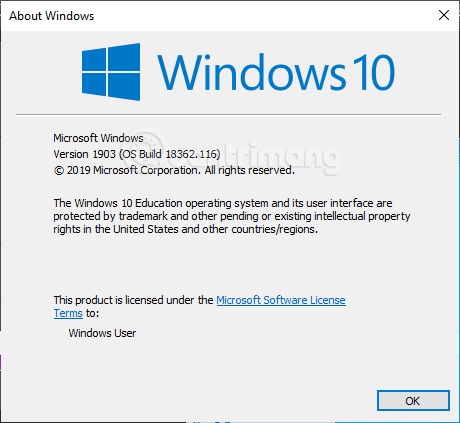
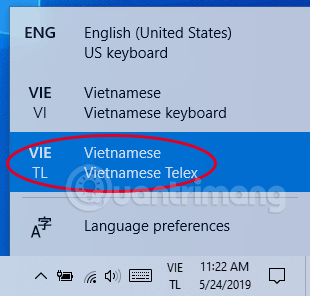
			Windows 10 May 2019 có sẵn bộ gõ tiếng Việt Telex mặc định, giúp gõ tiếng Việt trên Windows mà không cần cài thêm phần mềm của bên thứ ba. Tuy nhiên, không phải người dùng nào cũng được bật sẵn bộ gõ Telex này. Nếu bạn chưa tìm thấy bộ gõ Telex trên Windows 10 (1903) hãy làm theo hướng dẫn dưới đây để kích hoạt nhé.Lưu ý, bạn phải cập nhật lên Windows 10 1903 thì mới bật được bộ gõ tiếng Việt này nhé.
		</div>
				<div class="imghome">
			<img alt="Cách bật bộ gõ tiếng Việt Telex mặc định trong Windows 10 May 2019" src="https://tatthanhcomputer.com/uploads/news/2019_07/bat-bo-go-telex-windows-10-may-2019-7.png" width="460" class="img-thumbnail" />
		</div>
		<div class="clear"></div>
		<div id="bodytext" class="clearfix">
			<p><img alt="Phiên bản hỗ trợ bộ gõ tiếng Việt Telex" data-i="0" data-src="https://st.quantrimang.com/photos/image/2019/05/24/bat-bo-go-telex-windows-10-may-2019-8.png" data-was-processed="true" height="423" src="https://st.quantrimang.com/photos/image/2019/05/24/bat-bo-go-telex-windows-10-may-2019-8.png" width="460" /></p>

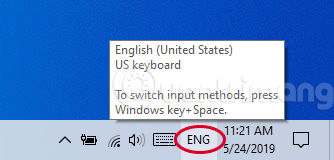
<p><strong>Bước 1:</strong>&nbsp;Nhấp vào<strong>&nbsp;ENG</strong>&nbsp;hoặc&nbsp;<strong>VIE</strong>&nbsp;ở góc dưới bên phải:</p>

<p><img alt="Nhấp vào chữ EN hoặc VIE ở góc dưới bên phải" data-i="1" data-src="https://st.quantrimang.com/photos/image/2019/05/24/bat-bo-go-telex-windows-10-may-2019-1.png" data-was-processed="true" height="160" src="https://st.quantrimang.com/photos/image/2019/05/24/bat-bo-go-telex-windows-10-may-2019-1.png" width="334" /></p>

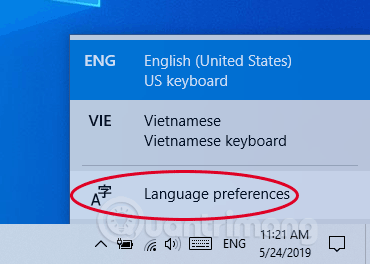
<p><strong>Bước 2:</strong>&nbsp;Chọn Vietnamese Telex, nếu chưa có bạn chọn&nbsp;<strong>Language preferences</strong>&nbsp;như trong hình:</p>

<p><img alt="Chọn Language preferences" data-i="2" data-src="https://st.quantrimang.com/photos/image/2019/05/24/bat-bo-go-telex-windows-10-may-2019-2.png" data-was-processed="true" height="264" src="https://st.quantrimang.com/photos/image/2019/05/24/bat-bo-go-telex-windows-10-may-2019-2.png" width="370" /></p>

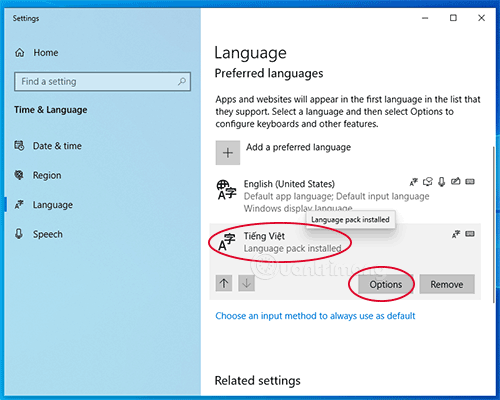
<p><strong>Bước 3:</strong>&nbsp;Nhấp 1 lần vào&nbsp;<strong>Tiếng Việt</strong>, nhấp tiếp vào&nbsp;<strong>Options</strong>&nbsp;vừa hiện ra:</p>

<p><img alt="Nhấp vào Options" data-i="3" data-src="https://st.quantrimang.com/photos/image/2019/05/24/bat-bo-go-telex-windows-10-may-2019-3.png" data-was-processed="true" height="400" src="https://st.quantrimang.com/photos/image/2019/05/24/bat-bo-go-telex-windows-10-may-2019-3.png" width="500" /></p>

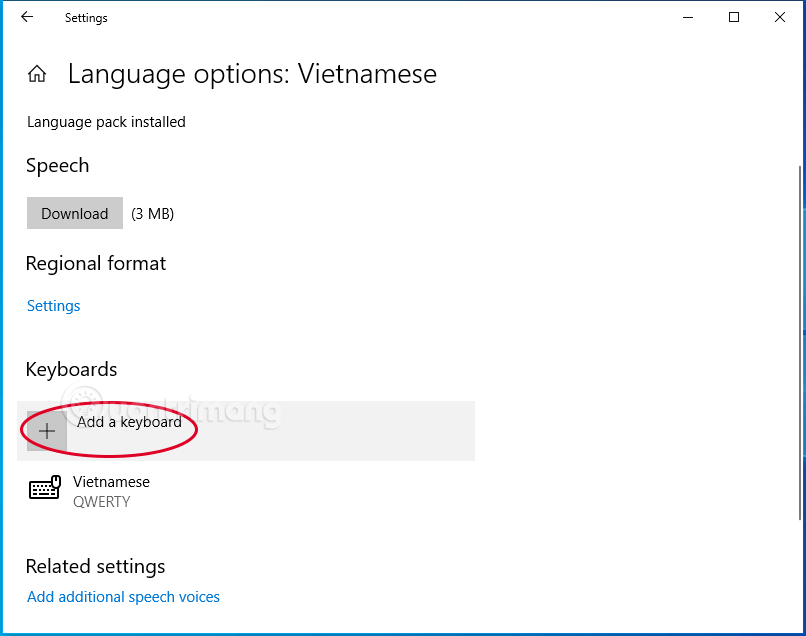
<p><strong>Bước 4:</strong>&nbsp;Trong mục&nbsp;<strong>Keyboards</strong>&nbsp;chọn&nbsp;<strong>Add a keyboard</strong>&nbsp;như bên dưới:</p>

<p><img alt="Chọn Add a keyboard" data-i="4" data-src="https://st.quantrimang.com/photos/image/2019/05/24/bat-bo-go-telex-windows-10-may-2019-4.png" data-was-processed="true" height="395" src="https://st.quantrimang.com/photos/image/2019/05/24/bat-bo-go-telex-windows-10-may-2019-4.png" width="500" /></p>

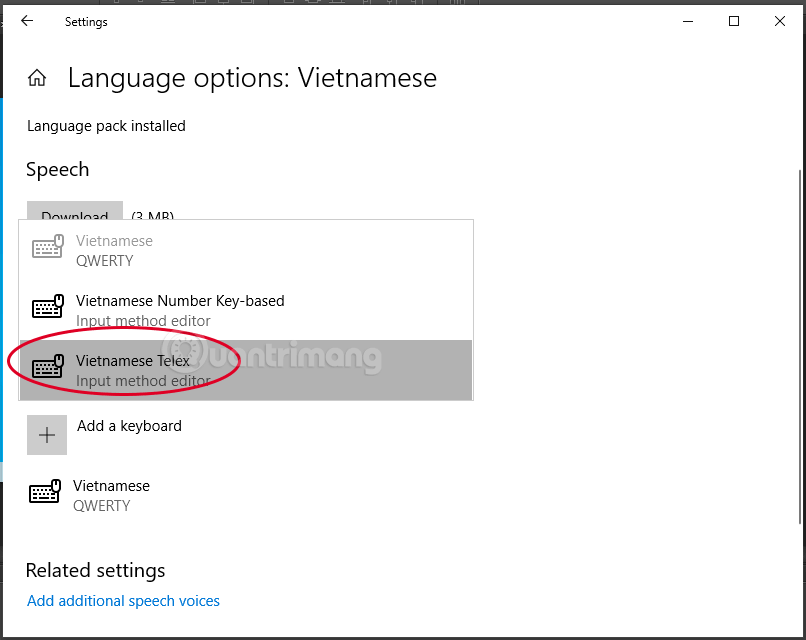
<p><strong>Bước 5:</strong>&nbsp;Trong danh sách hiện ra bạn chọn&nbsp;<strong>Vietnamese Telex</strong>:</p>

<p><img alt="Chọn Vietnamese Telex" data-i="5" data-src="https://st.quantrimang.com/photos/image/2019/05/24/bat-bo-go-telex-windows-10-may-2019-5.png" data-was-processed="true" height="397" src="https://st.quantrimang.com/photos/image/2019/05/24/bat-bo-go-telex-windows-10-may-2019-5.png" width="500" /></p>

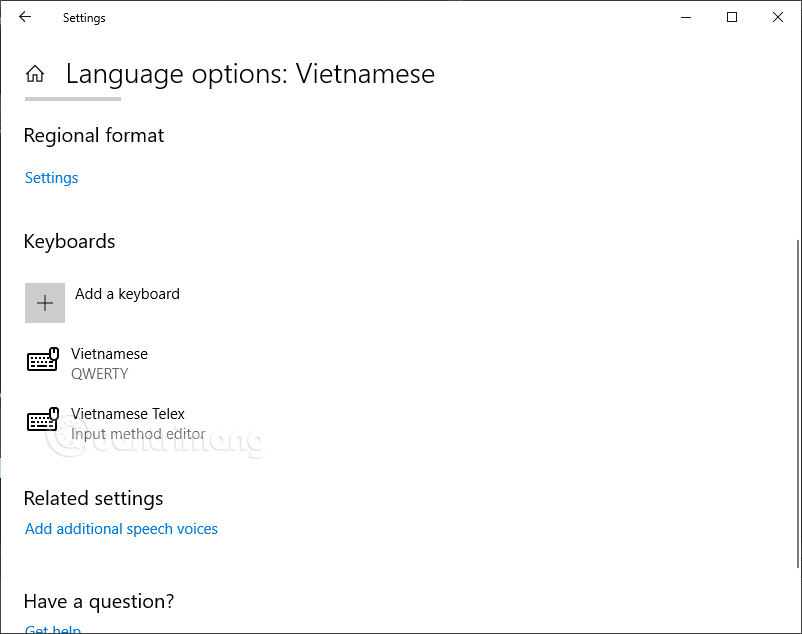
<p>Sau khi chọn xong bộ gõ Telex sẽ được liệt kê bên dưới Keyboard như sau:</p>

<p><img alt="Bộ gõ tiếng Việt Telex đã được thêm" data-i="6" data-src="https://st.quantrimang.com/photos/image/2019/05/24/bat-bo-go-telex-windows-10-may-2019-6.png" data-was-processed="true" height="395" src="https://st.quantrimang.com/photos/image/2019/05/24/bat-bo-go-telex-windows-10-may-2019-6.png" width="500" /></p>

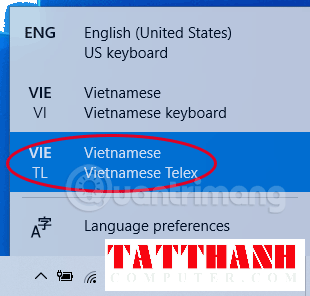
<p><strong>Bước 7:</strong>&nbsp;Để gõ tiếng Việt bằng bộ gõ Telex, bạn nhấp vào ENG hoặc VIE ở góc dưới bên phải như bước 1, chọn&nbsp;<strong>Vietnamese Telex</strong>.</p>

<p><img alt="Chọn Vietnamese Telex để gõ tiếng Việt" data-i="7" data-src="https://st.quantrimang.com/photos/image/2019/05/24/bat-bo-go-telex-windows-10-may-2019-7.png" data-was-processed="true" height="296" src="https://st.quantrimang.com/photos/image/2019/05/24/bat-bo-go-telex-windows-10-may-2019-7.png" width="310" /></p>

<p>Vậy là bạn đã kích hoạt được bộ gõ Telex rồi đấy, thử gõ xem nào.</p>

<p>Qua khoảng 1 buổi sáng trải nghiệm, mình thấy bộ gõ này dùng tạm ổn, đặc biệt là khi soạn thảo văn bản trên Chrome, chat chit trên Facebook, Viber. Tuy nhiên, thỉnh thoảng bị mất chữ, gõ trên các ứng dụng như Photoshop, Camtasia nó phải nhập từ vào 1 ô nhỏ ở góc trên bên trái rồi mới điền vào khung mình nhập. Đặc biệt khó chịu là khi mình dùng phím tắt công cụ (chỉ có 1 chữ) trong Photoshop, chữ v chẳng hạn, nó không chuyển sang công cụ mình cần mà lại nhập vào ô ở góc trên bên trái. Bạn nào quen dùng phím tắt thì sẽ không thích điều này tí nào.</p>

<p><strong>Cập nhật vài nhược điểm của bộ gõ tiếng Việt Telex trên Windows 10:</strong></p>

<ul>
	<li>Bản 1903 đi kèm 2 bàn phím 1 là Vietnamese Keyboard và 2 là Vietnamese Telex. Nếu vô tình chuyển sang Vietnamese Keyboard thì hàng số bên trên chữ không gõ được bình thường nữa, nó bị nhảy thành các chữ như ă, â, đ, các dấu. Mình làm theo Bước 1 đến 4 ở trên rồi xóa bộ gõ Telex đi, thêm lại thì lại dùng bình thường.</li>
	<li>Khi bạn gõ sai không sửa được mà phải xóa đi rồi viết lại.</li>
	<li>Thỉnh thoảng bị mất chữ, mình hay gặp với từ &quot;mà&quot; bị mất chữ &quot;m&quot;.</li>
	<li>Không hỗ trợ VNI (tất nhiên), nếu chuyển sang Vietnamese Keyboard gõ rất chi là loạn, chả hiểu là kiểu gõ gì, nên nếu phải dùng kiểu gõ khác ngoài Telex bạn vẫn buộc phải cài Unikey.</li>
</ul>

<p>Bạn đã dùng&nbsp;bộ gõ tiếng Việt&nbsp;Telex trên Windows 10 chưa, bạn có gặp phải vấn đề gì không? Hãy chia sẻ với bọn mình bằng cách bình luận bên dưới bài viết này nhé.</p>
		</div>
	</div>
	<div id="footer" class="clearfix">
		<div id="url">
			<strong>URL của bản tin này: </strong><a href="https://tatthanhcomputer.com/news/thu-thuat/cach-bat-bo-go-tieng-viet-telex-mac-dinh-trong-windows-10-may-2019-33.html" title="Cách bật bộ gõ tiếng Việt Telex mặc định trong Windows 10 May 2019">https://tatthanhcomputer.com/news/thu-thuat/cach-bat-bo-go-tieng-viet-telex-mac-dinh-trong-windows-10-may-2019-33.html</a>

		</div>
		<div class="clear"></div>
		<div class="copyright">
			&copy; TẤT THÀNH COMPUTER - MÁY TÍNH - HIEND COMPUTER - GAMING GEAR - LẶP ĐẶT CAMERA - MÁY TÍNH KIẾN ĐỨC LÂM ĐỒNG - PC ĐĂK NÔNG -SỮA MÁY TÍNH
		</div>
		<div id="contact">
			<a href="mailto:tatthanhcomputer@gmail.com">tatthanhcomputer@gmail.com</a>
		</div>
	</div>
</div>
        <div id="timeoutsess" class="chromeframe">
            Bạn đã không sử dụng Site, <a onclick="timeoutsesscancel();" href="https://tatthanhcomputer.com/#">Bấm vào đây để duy trì trạng thái đăng nhập</a>. Thời gian chờ: <span id="secField"> 60 </span> giây
        </div>
        <div id="openidResult" class="nv-alert" style="display:none"></div>
        <div id="openidBt" data-result="" data-redirect=""></div>
<script src="https://tatthanhcomputer.com/assets/js/jquery/jquery.min.js"></script>
<script>var nv_base_siteurl="/",nv_lang_data="vi",nv_lang_interface="vi",nv_name_variable="nv",nv_fc_variable="op",nv_lang_variable="language",nv_module_name="news",nv_func_name="savefile",nv_is_user=0, nv_my_ofs=-4,nv_my_abbr="EDT",nv_cookie_prefix="nv4c_r9Q7G",nv_check_pass_mstime=1738000,nv_area_admin=0,nv_safemode=0,theme_responsive=1,nv_is_recaptcha=0;</script>
<script src="https://tatthanhcomputer.com/assets/js/language/vi.js"></script>
<script src="https://tatthanhcomputer.com/assets/js/global.js"></script>
<script src="https://tatthanhcomputer.com/themes/memory/js/news.js"></script>
<script src="https://tatthanhcomputer.com/themes/memory/js/main.js"></script>
<script src="https://tatthanhcomputer.com/themes/memory/js/jquery-migrate-3.0.1.js"></script>
<script src="https://tatthanhcomputer.com/themes/memory/js/double_tab_togo.js"></script>
<script src="https://tatthanhcomputer.com/themes/memory/js/owl.carousel.min.js"></script>
<script src="https://tatthanhcomputer.com/themes/memory/js/appear.js"></script>
<script src="https://tatthanhcomputer.com/themes/memory/js/script.js"></script>
<script src="https://tatthanhcomputer.com/themes/memory/js/bootstrap.min.js"></script>
</body>
</html>